 Owncast ahora soporta plugins personalizados.
 Habilitar la autenticación de chat
By default there is no requirement to authenticate when using Owncast chat. Sin embargo, algunos prefieren autenticarse para verificar su identidad ante otros, y para continuar usando la misma identidad de chat a través de múltiples dispositivos y navegadores. Esto es especialmente útil para aquellos con privilegios de moderador.
Server operators can also turn on Require Authentication in the admin under Configuration > Chat.
When it is on, anyone who has not authenticated, other than moderators, is rejected when they try to send
a chat message.
Puedes acceder a las opciones de autenticación a través del menú desplegable de chat en la parte superior derecha de la página.
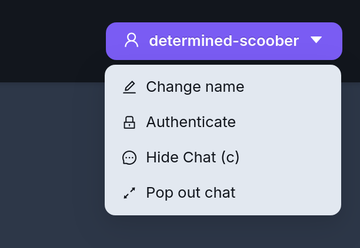
- FediAuth
- IndieAuth
Autenticación del Fediverso (FediAuth)
Using your Fediverse account you can be sent a one time use six digit code to verify your identity and authenticate yourself with Owncast chat. El soporte de Fediverso debe estar habilitado en el servidor de Owncast para que esta función esté disponible.
The code arrives as a direct message to your account. Si no recibes este mensaje, asegúrate de que puedes aceptar mensajes directos.
The code is valid for 10 minutes. After that you will need to request a new one.
IndieAuth
IndieAuth es un protocolo de autenticación descentralizado de estándar abierto que permite a los servicios verificar la identidad de un usuario representado por una URL. Esto significa que cualquiera que tenga una URL existente que soporte IndieAuth puede usarla para autenticarse en el chat de Owncast.
Visita IndieAuth.net para aprender más.
Owncast es un servidor IndieAuth
If you run an Owncast server you can use it as your IndieAuth provider by entering the URL of your server. Authenticating this way verifies you as the admin of that Owncast server.
Improve this page
See something missing or incorrect? Edit the English version of this page or help improve translations.
