 Owncast prend maintenant en charge des plugins personnalisés.
 Activer l'authentification par chat
By default there is no requirement to authenticate when using Owncast chat. Cependant, certains préfèrent to s'authentifier pour vérifier leur identité auprès des autres, et pour continuer à utiliser la même identité de chat sur plusieurs appareils et navigateurs. Cela est particulièrement utile pour ceux ayant des privilèges de modérateur.
Server operators can also turn on Require Authentication in the admin under Configuration > Chat.
When it is on, anyone who has not authenticated, other than moderators, is rejected when they try to send
a chat message.
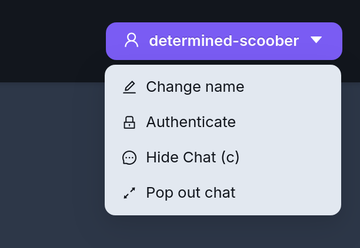
Vous pouvez accéder aux options d'authentification via le menu déroulant de chat en haut à droite de la page.
- FediAuth
- IndieAuth
Authentification Fediverse (FediAuth)
Using your Fediverse account you can be sent a one time use six digit code to verify your identity and authenticate yourself with Owncast chat. Le support Fediverse doit être activé sur le serveur Owncast pour que cette fonctionnalité soit disponible.
The code arrives as a direct message to your account. Si vous ne recevez pas ce message, assurez-vous de pouvoir accepter des messages directs.
The code is valid for 10 minutes. After that you will need to request a new one.
IndieAuth
IndieAuth est un protocole d'authentification décentralisé et standard ouvert qui permet aux services de vérifier l'identité d'un utilisateur représenté par une URL. Cela signifie que toute personne disposant d'une URL existante prenant en charge IndieAuth peut l'utiliser pour s'authentifier avec le chat Owncast.
Visitez IndieAuth.net pour en savoir plus.
Owncast est un serveur IndieAuth
If you run an Owncast server you can use it as your IndieAuth provider by entering the URL of your server. Authenticating this way verifies you as the admin of that Owncast server.
Improve this page
See something missing or incorrect? Edit the English version of this page or help improve translations.
