 Owncast prend maintenant en charge des plugins personnalisés.
Téléviseurs LG Smart (WebOS)
Smart TV
lgwebossmart-tvm3uiptvtélévisionregarder
IPTV Playlist App
RecommandéInstall an IPTV player from the LG Content Store and point it at the Owncast directory playlist.
- Parcourez tout le répertoire Owncast directement sur votre télévision.
- webOS has no native M3U playlist support, so this needs a third-party player.
- Reload the playlist to pick up the streams that are live now.
Afficher des instructions étape par étape
- Install an IPTV or M3U player from the LG Content Store. Availability varies by region and by TV model.
- Add a playlist using this URL:
https://owncast.directory/api/iptv. Make sure it starts withhttps. - Double check you typed it in correctly, then save the playlist.
- Reload or reopen the playlist to refresh the list of live streams.
- Choisissez le flux en direct que vous souhaitez regarder.
Note: Players differ in how a playlist is added. Some take the URL on the TV, and others want you to upload the playlist through their own website keyed to your TV. Follow whichever method your chosen app documents.
Entrée d'URL directe
Use the webOS Web browser app to open an Owncast stream directly on the TV.
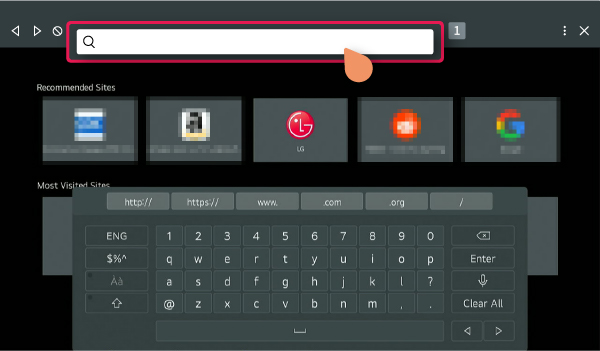
- webOS includes a Web browser app on the Home menu.
- Nécessite une saisie manuelle de l'URL.
- LG notes that browser functions are more limited than on a computer or phone.
Afficher des instructions étape par étape
- Open Web browser from Home on your LG webOS TV.
- Enter your Owncast server URL in the address bar.
- Essayez de lire le flux directement dans le navigateur.
Note: TV browsers are limited compared with a phone or computer, so web video playback may not work reliably.
Improve this page
See something missing or incorrect? Edit the English version of this page or help improve translations.
Contributors to this documentation
