 Owncast ora supporta plugin personalizzati.
 Notifiche di live streaming
Alcuni streaming beneficiano dell'annuncio al loro pubblico quando vanno in diretta.
Questa non è un'approvazione di alcun servizio particolare, ma potrebbe aiutare alcuni streamer a integrarsi nelle loro comunità esistenti.
Se desideri approfondire questo e inviare notifiche automatiche ad altre destinazioni, crea un webhook.
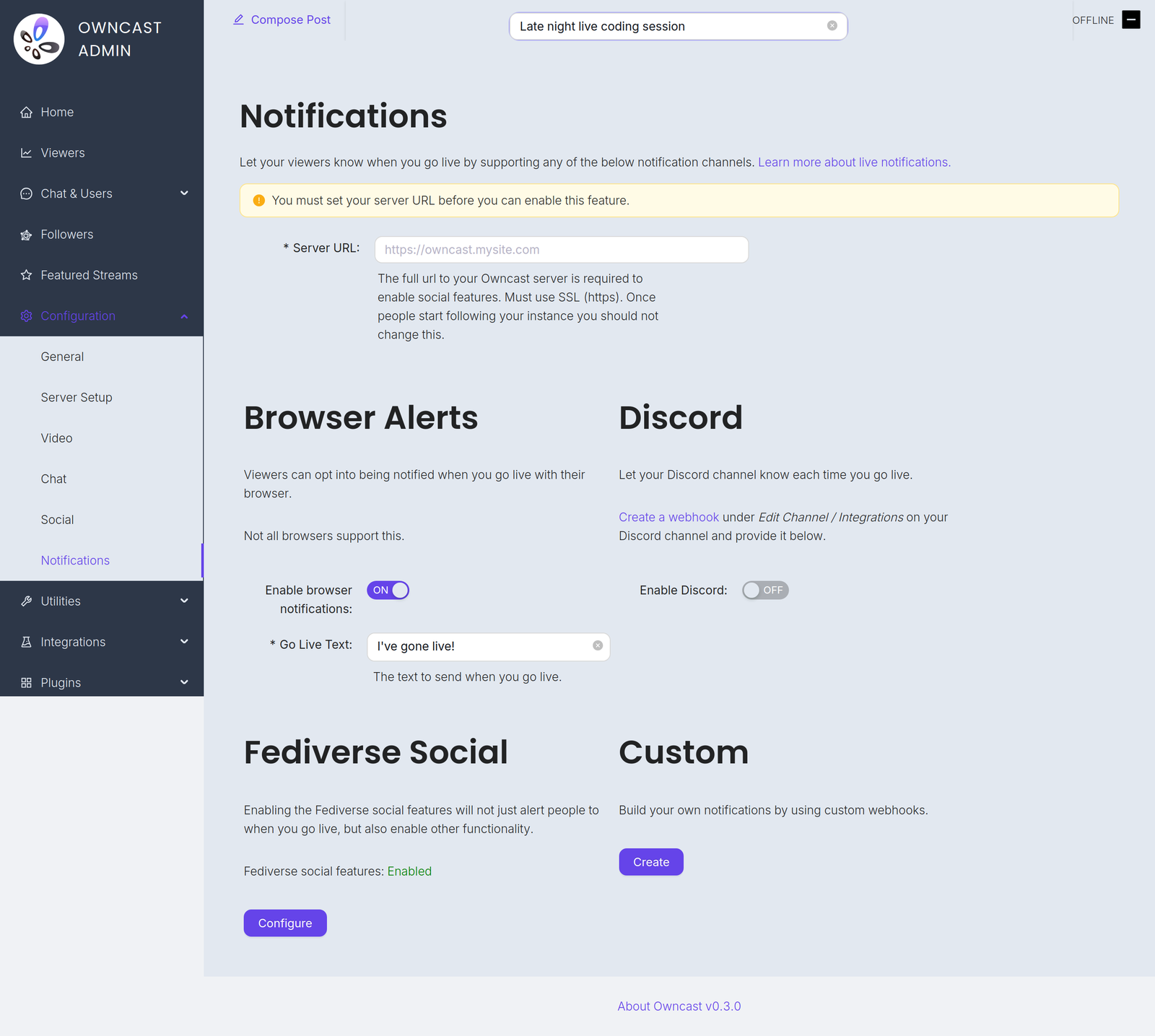
Troverai questi canali sotto Configurazione → Notifiche nell'admin.
Before you can enable any of them you must set your Server URL under Configuration → General. Until you do, every notification channel on this page is disabled and the admin shows a warning with a field to set it.
Go-live notifications are not instant. Owncast waits 2 minutes after your stream starts before sending them, which avoids notifying people about accidental or very short streams. And if a notification already went out in the previous 10 minutes, for example because your stream briefly dropped and reconnected, a new one is not sent.
- Notifiche del browser
- Estensione del browser
- Fediverse
- Discord
- Personalizzato
Utilizzando le notifiche push del browser, i tuoi spettatori possono scegliere di essere avvisati ogni volta che vai in diretta.
To offer this, turn on Enable browser notifications and set the required Go Live Text, the message sent when you go live, up to 200 characters.
Browser push notifications are not supported for local servers. Your instance must be reachable at a public HTTPS address.
Non tutti i browser supportano questa funzionalità e i browser che lo fanno potrebbero gestirlo in modo diverso. Brave, ad esempio, richiede di scegliere la durata per la quale le notifiche sono valide. Vorranno probabilmente selezionare "Per sempre" per mantenere attiva la notifica.
Abilitare le notifiche del browser su iOS
Puoi richiedere di essere avvisato quando uno streaming va in diretta su iOS seguendo questi passaggi:
- Apri Safari e naviga alla tua istanza di Owncast.
- Tap the share button in Safari.
- Scroll down and tap "Add to Home Screen".
- Tap "Add".
- Give the link a name and tap the new icon on your home screen.
- Press the "Notify" button and enable notifications.
- Tocca "Consenti" quando richiesto.
Un altro modo suggerito per ricevere notifiche del browser da un numero qualsiasi di streaming è utilizzare l'Estensione del browser Owncast di craftamap. È disponibile per Chrome e Firefox.
Le funzionalità social del Fediverse hanno un supporto integrato per notificare i tuoi follower quando vai in diretta. Visita la documentazione per ulteriori informazioni.
Puoi notificare un canale Discord quando il tuo streaming va in diretta.
- Visit Edit Channel / Integrations on your Discord channel and create a webhook. The Discord documentation has complete instructions.
- In the Owncast admin, turn on Enable Discord.
- Paste the webhook into the Webhook URL field.
- Set the Go Live Text, the message posted when you go live, up to 300 characters.
Puoi creare le tue notifiche personalizzate utilizzando webhook. Questo ti consente di inviare notifiche a qualsiasi servizio scrivendo la tua integrazione.
Improve this page
See something missing or incorrect? Edit this page and improve the documentation for everyone.
