 Owncast はカスタムプラグインをサポートするようになりました。
チャット認証を有効にする
By default there is no requirement to authenticate when using Owncast chat. ただし、自分自身を認証して他者に本人確認を行ったり、複数のデバイスやブラウザで同じチャットのアイデンティティを使用し続けることを好む人もいます。 これは、モデレーターの権限を持つ人々に特に役立ちます。
Server operators can also turn on Require Authentication in the admin under Configuration > Chat.
When it is on, anyone who has not authenticated, other than moderators, is rejected when they try to send
a chat message.
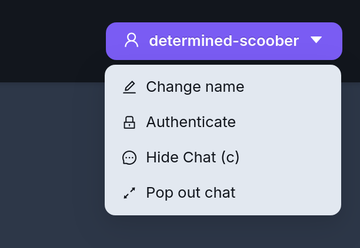
ページの右上にあるチャットのドロップダウンメニューから認証オプションにアクセスできます。
- FediAuth
- IndieAuth
フェディバース認証(フェディオース)
Using your Fediverse account you can be sent a one time use six digit code to verify your identity and authenticate yourself with Owncast chat. この機能を利用するには、Owncastサーバーでフェディバースのサポートを有効にする必要があります。
The code arrives as a direct message to your account. このメッセージが届かない場合は、直接メッセージを受信できることを確認してください。
The code is valid for 10 minutes. After that you will need to request a new one.
IndieAuth
インディーオースは、URLで表されるユーザーの身分をサービスが確認するためのオープンスタンダードな分散型認証プロトコルです。 これは、インディーオースをサポートする既存のURLを持つ誰でも、それを使用してOwncastチャットで本人確認を行うことができることを意味します。
詳細については、IndieAuth.netを訪れてください。
Owncastはインディーオースサーバーです
If you run an Owncast server you can use it as your IndieAuth provider by entering the URL of your server. Authenticating this way verifies you as the admin of that Owncast server.
Improve this page
See something missing or incorrect? Edit this page and improve the documentation for everyone.
