 Owncast はカスタムプラグインをサポートするようになりました。
色と外観のカスタマイズ
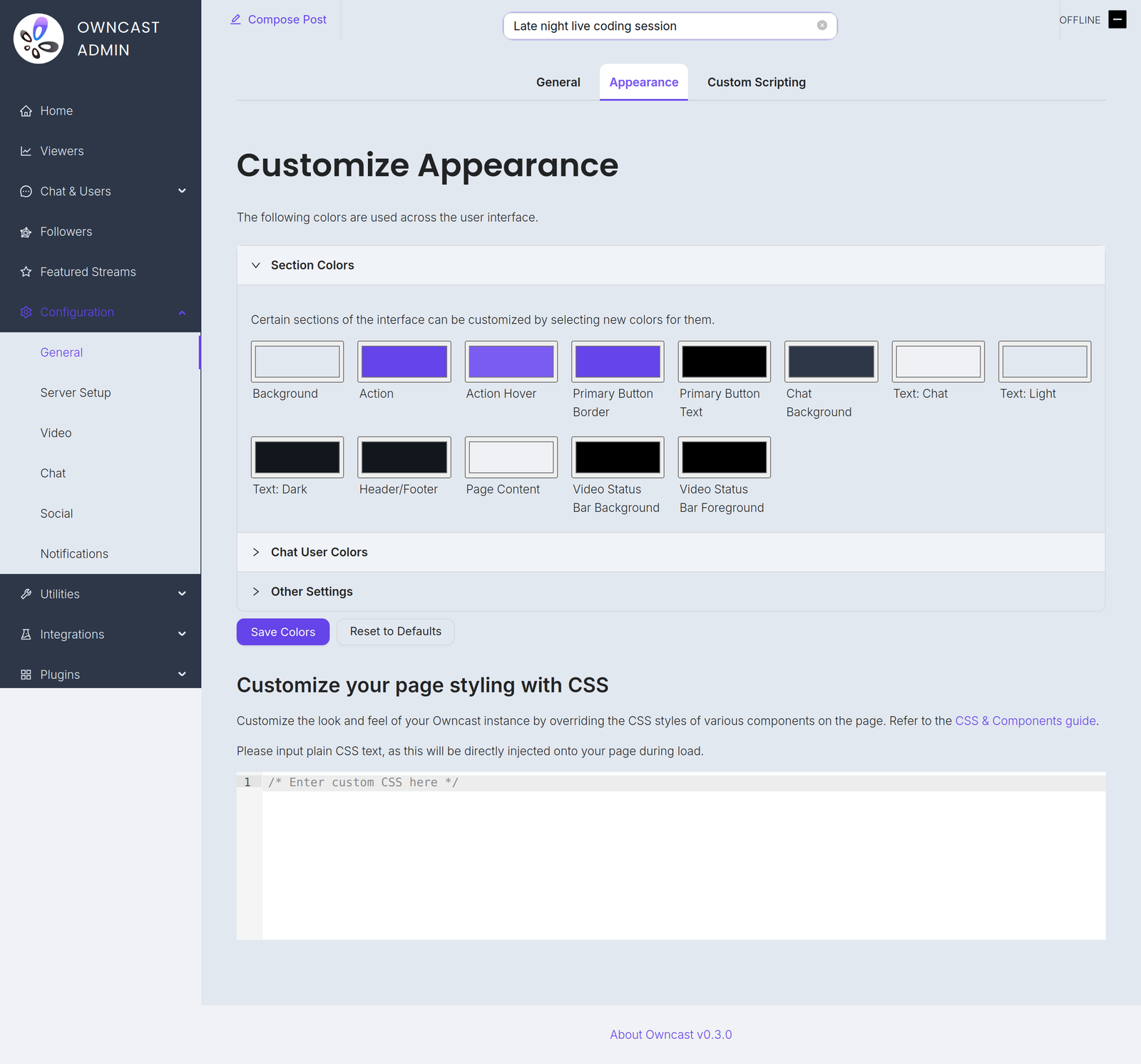
管理画面の 設定 → 一般 → 外観 から Owncast ページの色と外観をカスタマイズできます。 コード不要のセクションのカラーピッカーから始めてください。 より細かい制御が必要な場合はエディタで独自の CSS を記述でき、下の Owncast CSS ヘルパー が貼り付けられる出発点を生成します。
カスタム CSS をさらに進める場合、CSS セレクタ と CSS 変数の構文に慣れていると役立ちますが、始めるのにどちらも必須ではありません。
CSS セレクター
| セレクター | 説明 |
|---|---|
header | ページのヘッダー要素 |
footer | ページのフッター要素 |
#global-header-text | ヘッダー内のテキスト |
#offline-banner | 配信がオフラインのときに表示されるバナー |
#custom-page-content | ページのカスタムコンテンツ |
#notify-button | 通知モーダルを表示するボタン |
#follow-button | フォローモーダルを表示するボタン |
#followers-collection | フォロワーのコレクション |
#modal-container | モーダル用のコンテナ |
#chat-container | チャット用のコンテナ |
.chat-message_user | ユーザーが送信したチャットメッセージ |
.chat-message_system | システムが送信したチャットメッセージ |
.chat-message_social | Fediverseからのソーシャルメッセージ |
.followers-follower | フォロワーのコレクション内の単一のフォロワー |
CSS 変数
管理画面の CSS エディタで設定することで、CSS 変数に割り当てられた値を手動で上書きできます。 上書き可能な変数名の一覧を確認できます。
例えば、すべてのアクション項目(リンク、ボタン)を赤、ボタンの境界線を緑、本文フォントをserifフォントにしたい場合、次の CSS 変数を次のように設定できます:
:root {
  --theme-color-action: red;
  --theme-color-components-primary-button-border: green;
  --theme-text-body-font-family: serif;
}
追加のセレクターと変数
CSS を使用すればページ上の任意の要素をターゲットにできますが、特定の要素のカスタマイズに困難を感じる場合は、カスタマイズを容易にするための追加のセレクターや CSS 変数の追加を検討できるよう、Owncast GitHub リポジトリに issue を開いてください。 一般的なユースケースに対して、Owncast の外観ページ内に直接、より多くのカスタマイズオプションを追加する可能性もあります。 特定の部分をカスタマイズしたい場合、貢献は歓迎します!
外観とテーマプラグイン
Theme plugins require Owncast 0.3.0 or later.
プラグインはビューワーページのスタイルも変更できます。 テーマプラグインは、パッケージ化された見た目をインストール・共有するためのサポートされた方法です。 このページの設定とプラグインのスタイルが組み合わさって最終結果になります。
あなたの選択が優先されます。 ここで選んだ色やエディタで書いた CSS はプラグインのスタイルの上に適用されるため、同じ色に対して両方が触れる場合はあなたの設定が適用されます。 テーマプラグインはベースラインとして機能します: あなたが設定していない色を変更し、あなたが明示的に設定した色はそれを上書きします。
プラグインがページのスタイルを変更している場合、このページでは次のことを伝えます:
- 上部の通知に現在スタイルを適用しているプラグイン名が表示されます。
- プラグインが設定している各色は、ピッカーの横に
also set by <plugin>という注記が付けられます。
結果を制御するレバーが2つあります:
- テーマプラグインに外観を完全に任せるには、デフォルトにリセットで自身の色をクリアしてください。 ここで何も設定していない場合、プラグインのテーマが完全に反映されます。
- プラグインのスタイルを完全に停止するには、管理画面の プラグイン ページでそれを無効にしてください。
Owncast CSS ヘルパー
CSS 変数で Owncast の色をカスタマイズしたり特定の要素をカスタマイズしたりする際は、以下の CSS ヘルパーを使用してください。 これは自身の CSS 作成の出発点を提供するものであり、完全なソリューションではありません。 カラーピッカーで色を選び、必要に応じて CSS を直接編集し、その結果をコピーして Owncast 管理画面の 設定 → 一般 → 外観 に貼り付けてください。

カスタム CSS をコピー&ペーストして、テーマとして他の Owncast ユーザーと共有できます!
Owncast Components
Select colors to customize your Owncast instance. The CSS will be generated automatically.
--theme-color-action--theme-color-action-hover--theme-color-background-main--theme-color-background-header--theme-color-components-primary-button-background--theme-color-components-primary-button-text--theme-color-components-primary-button-border--theme-color-components-chat-background--theme-color-components-chat-text--theme-color-components-chat-input-background--theme-color-palette-0--theme-color-palette-1--theme-color-palette-2headerThe main header element
footerThe main footer element
#global-header-text#offline-bannerThe banner that appears when the stream is offline
#custom-page-contentThe custom content of the page
#notify-buttonButton to display the notify modal
#follow-buttonButton to display the follow modal
#followers-collection#modal-containerThe container for the modals
#chat-container.chat-message_userA user-sent chat message
.chat-message_systemA system-sent chat message
.chat-message_socialA social message from the Fediverse
.followers-followerA single Follower in the followers collection
Generated CSS
Improve this page
See something missing or incorrect? Edit this page and improve the documentation for everyone.
