 Owncast はカスタムプラグインをサポートするようになりました。
Plugin Permissions
全てのOwncastプラグインはサンドボックス内で実行され、プラグイン自体の外部に暗黙のアクセスはありません。 有用な作業を行うために(チャットを読む、フェディバースに投稿する、URLを取得する、キーと値のストアに書き込むために)、プラグインはowncast.*メソッドを通じてホストに要求します。 Almost every one of those methods is gated by a permission you declare in your manifest. The exceptions are a handful of ambient methods that reach nothing sensitive and need no permission: owncast.log.*, owncast.timer.*, reading your own bundled assets, and owncast.config.get.
Plugins require Owncast 0.3.0 or later.
管理者がプラグインをインストールすると、プラグインの詳細ページの権限タブでは、プラグインが要求した内容が正確に一覧表示され、平易な言葉で説明されています。 これが信頼境界です:管理者はすべてのコード行を監査することなくサードパーティプラグインをインストールできます。マニフェストはプラグインができることの上限です。
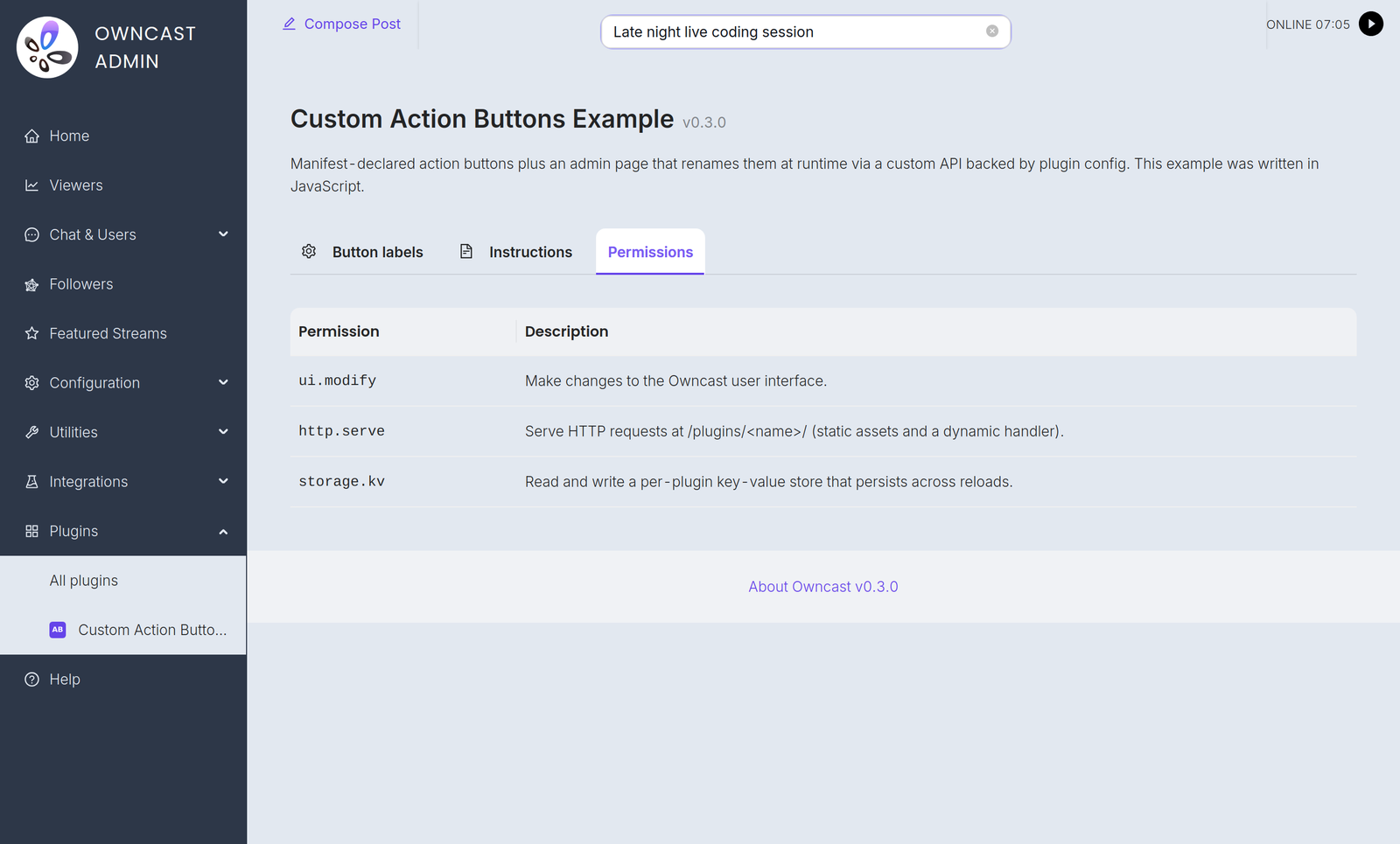

権限識別子と下記の信頼モデルは、使用するSDKに関わらず同じです。 owncast.*メソッドは、ここでその標準名で言及されます。 正確なスペルは、JavaScript または Python SDKリファレンスを参照してください。
仕組み
-
plugin.manifest.json内で権限を宣言します:{ "permissions": ["chat.send", "storage.kv"] } -
管理者は有効化するときにそれらをレビューします。 Owncastのプラグイン詳細ページでは、各権限が人間にわかりやすく説明されています。
-
ホストは、ランタイムでの権限を強制します。 Calling
owncast.chat.send(...)withoutchat.sendin your manifest never reaches Owncast: the host logs the denial and the call does nothing. Mutating calls that report an outcome raise an error (moderation,users.register,auth.grantSession,kv.set,videoConfig.write,actions.add,actions.clear, and everysqlmethod), readers return an empty or zero value, and calls that return nothing become silent no-ops.fs.write,fs.delete, andstorage.uploadreport failure in their return value instead of raising. -
ホストは漂流をキャッチします。 作成したプラグインは、ランタイムで使用する権限を宣言します。 ホストはそれをマニフェストと比較し、ランタイムがマニフェストが許可した以上のことを要求した場合はプラグインの読み込みを拒否します。 事後にプラグインファイルを入れ替えることで、追加のアクセスを取得することはできません。
権限が拡大された場合の再承認
If you ship an update that asks for more permissions than the admin previously approved, the old approved version keeps running (it holds only the approved permissions) and the new package waits as pending. The plugin list shows a "needs re-approval" badge. The admin reviews the new permissions in the Permissions tab and clicks Approve to accept the expanded set and load the update. 権限を縮小することは黙認されます。
インストールされたプラグインの実効的な機能は、管理者が再度同意しない限り増加することはありません。
権限リファレンス
chat.send
付与される権限:
owncast.chat.send(text): プラグインのボットIDとして投稿するowncast.chat.sendAction(text): "/me" メッセージを投稿するowncast.chat.sendTo(clientId, text): 接続されたクライアントにプライベートメッセージを送るowncast.chat.replyTo(msg, text): whisper a reply back to whoever sent a chat message (sugar oversendTo)owncast.chat.system(body): ユーザーIDなしでシステムメッセージを投稿する。サーバー通知として表示されます(本文はHTML)
メッセージはOwncastの通常のチャットパイプライン(フィルター、レート制限、永続性、モデレーション)を通過します。 プラグインは任意の名前で送信したり、実際のユーザーを偽装したりすることはできません。
chat.history
付与される権限:
owncast.chat.history(limit?): 最近のチャットメッセージを読むowncast.chat.clients(): 接続されたチャットクライアントをリストする
読み取り専用。
chat.moderate
付与される権限:
owncast.chat.deleteMessage(messageId): 視聴者からメッセージを隠すowncast.chat.kick(clientId): チャットクライアントを切断する
chat.filter
filterChatMessage(msg)を定義する権限を付与します。ブロードキャストされる前にすべてのチャットメッセージを見て、書き換えたり削除したりすることができます。
フィルタリングはすべてのチャットメッセージでインラインで行われるため、管理者はこれが明示的に呼び出されるのを確認する必要があります。 プラグインがこの権限を宣言せずにfilterChatMessageを定義した場合、ホストは読み込みを拒否します。
users.read
Grants:
owncast.users.list(): チャットユーザーリストを読むowncast.users.get(id): 単一ユーザーのレコードを読む
users.moderate
付与される権限:
owncast.users.setEnabled(id, enabled, reason?): ユーザーを有効または無効にするowncast.users.banIP(ip): チャットへの参加を禁止する
users.register
Grants owncast.users.register({ authId, displayName?, scopes?, profileUrl?, handle?, public? }): find or create an authenticated Owncast user for an external identity and return its userId. The authId is a stable, provider-scoped identifier such as "github:583231". Pass it raw, without prefixing your slug. The host records the slug separately and scopes every lookup to that pair, so two plugins cannot collide with or spoof each other's users.
The optional profileUrl, handle, and public fields attach a verified external identity. The profile URL must be empty or an absolute HTTP(S) URL. Set public to true only after the viewer opts into public display. These profile fields are captured on the first registration.
これにより、プラグインはサードパーティのログイン(OAuth、Discord、共有パスワードなど)を認証されたチャットアイデンティティを持つ実際のOwncastユーザーに変換します。 それ自体ではサイトを制御したり、セッションを発行したりすることはありません:auth.gateとペアにしてログインゲートを構築するか、単独で使用して確認済みのチャットアイデンティティを作成します。
auth.gate
ビューワー認証ゲートを付与します:
owncast.auth.grantSession({ userId, ttl? }): issue a signed session for an already-registered user (seeusers.register)owncast.auth.endSession(): 現在のビューワーのセッションをクリアします(サインアウト)- オプションの
onAuthCheckハンドラー:各ページ読み込み時にビューワーのセッションを再検証します
auth.gateを持つプラグインはアイデンティティプロバイダーです。 While it is enabled, viewers must authenticate through it before they can reach the page, chat, or the API. The operator selects one cumulative access mode on the plugin's Authentication tab to decide whether Owncast-hosted video and stream status also require a session. 1つのauth.gateプラグインのみが同時に有効化されることができ、ゲートは閉じた状態で失敗します:プラグインが利用できない場合、ビューワーは入ることができません。 完全なモデルについては**認証**を参照してください。
storage.kv
Grants owncast.kv.get(key), owncast.kv.set(key, value), and the JSON helpers owncast.kv.getJSON(key, fallback?) and owncast.kv.setJSON(key, value): a per-plugin namespaced key/value store. プラグインは互いのキーを読み取ることはできません。
状態はリロードやホストの再起動を超えて持続します。
storage.upload
Grants owncast.storage.upload(name, data): upload a file to Owncast's public file area and get back a URL. バッジ、動的に生成された画像、フェディバースの投稿添付ファイルに便利です。
storage.fs
Grants owncast.fs.*: a private, sandboxed filesystem at data/plugin-storage/<your-slug>/files/ that your plugin can read, write, list, and delete within. キャッシュ、生成データファイル、追加スタイルのログ、リアルファイルとして持続させる必要があるものに便利です。
storage.uploadとは異なり、これらのファイルはサーバー側に保持されます:HTTP経由で配信されることはありません。 すべてのパスはプラグイン自身のディレクトリに制限されており、プラグインは他のプラグインのファイルにアクセスしたり、サンドボックスを抜けたりすることはできません(../および絶対パスは内部に戻されます)。
storage.sql
Grants owncast.sql.*: one private SQLite database per plugin, at data/plugin-storage/<your-slug>/db/plugin.db. owncast.sql.exec(sql, params?) runs statements, owncast.sql.query(sql, params?) returns matching rows, and owncast.sql.queryRow(sql, params?) reads a single row. Reach for this instead of storage.kv when you need to sort, filter, or aggregate rather than just remember a value. See owncast.sql.* for the methods in both languages, the per-call limits, and the SQL the host refuses.
The database is private to your plugin and separate from Owncast's own database. The storage.fs sandbox is rooted at files/, so db/ is not a path owncast.fs.* refuses but one it cannot express, and the filesystem quota walk covers files/ only, so the two quotas stay independent: the database has its own 128 MiB cap, and files written through storage.fs count against a separate 256 MiB quota.
Plugin databases are not included in Owncast's database backups, so treat the contents as rebuildable or export what matters yourself. SQL data is retained when a plugin is uninstalled, the same as its config and its storage.fs files, so a reinstall finds its tables where it left them. An admin who wants the space back deletes data/plugin-storage/<your-slug>/.
network.fetch
owncast.http.fetch(url, opts?)を付与します:同期的なアウトバウンドHTTP。
マニフェスト内にnetwork.allowedHostsリストが必要です。 network.fetchが許可されているが、ホワイトリストが無い場合、読み込みを拒否します。 各呼び出しは、ホワイトリストに対して確認されます。 一致しないホストはサーバーからバイトが出る前にエラーを返します。
{
  "permissions": ["network.fetch"],
  "network": { "allowedHosts": ["api.discord.com", "*.weather.com"] }
}
ワイルドカード"*"は許可されますが、管理者がマニフェストをレビューできるように明示的に書かなければなりません。 管理者UIは、プラグインリスト内の権限タブにnetwork.fetchの行の隣に完全なallowedHostsリストを表示するため、プラグインをレビューするサーバー運営者が、.ocpkgを展開しなくても、プラグインがどのホストに到達できるかを正確に理解できます。
events.emit
Grants owncast.events.emit(eventType, payload). Pass the receiving plugin's
fully qualified <recipient-slug>.<hook> name. The host does not rewrite the
emitted name. Declaring and receiving a plugin-owned custom hook does not
require a permission.
http.serve
ホストのHTTPルーターに、/plugins/<your-slug>/*でプラグインにリクエストを送信する権限を付与します。 これには、あなたのpublic/ディレクトリ内の静的ファイルと、あなたのonHttpRequestハンドラーにルーティングされる動的リクエストの両方が含まれます。
この権限がないと、/plugins/<your-slug>/のURL空間全体が404を返します。
http.sse
owncast.sse.send(channel, event, data)を許可し、/plugins/<your-slug>/_sse/<channel>にホストが所有するエンドポイントを公開します。ブラウザーはEventSourceで接続します。 http.serveとは独立しています。 プラグインは、他のルートを提供せずにイベントをプッシュできます。
server.read
読み取り専用ストリームとサーバーステートAPIを付与します:
owncast.stream.current(): ライブストリーム状態owncast.stream.broadcaster(): インバウンドエンコードのテレメトリーowncast.server.info(): サーバー名、バージョン、概要owncast.server.socials(): 設定されたソーシャルリンクowncast.server.emotes(): custom chat emotes configured on this serverowncast.server.federation(): フェデバースの設定owncast.server.tags(): 設定されたタグ
videoconfig.read
owncast.videoConfig.read():出力とトランスコーディングの設定(コーデック、レイテンシレベル、ストリームバリアント)を読み取ります。
videoconfig.write
owncast.videoConfig.write(partial):ビデオ出力設定を変更します。
高い信頼性。 変更は次のストリーム開始時に適用されます。 ホストはアクティブなブロードキャストを再起動しません。 管理者は控えめに付与すべきです。
notifications.send
ブロードキャスタ通知APIを付与します:
owncast.notifications.discord(text):ストリーマーが設定したDiscordのWebhookを介してowncast.notifications.browserPush({ title, body, url? }): to subscribed browsersowncast.notifications.fediverse({ type, body, image?, link? }): fediverse-formatted notification
fediverse.inbound
すべての7つのフェディバースプラグインイベントへのサブスクリプションを付与します:
fediverse.followfediverse.likefediverse.repostfediverse.quotefediverse.mentionfediverse.replyfediverse.activity
fediverse.activityのキャッチオールは、検証されたアクティビティの生のJSONオブジェクトを受け取ります。 これは、特定のイベントに加えて実行されます。 この権限はアクティビティを受信することのみをカバーします。 Owncastアカウントから投稿するには、別のfediverse.post権限が必要です。
fediverse.post
owncast.fediverse.post(text)を付与します:Owncastアカウントからフェディバースに公開投稿を行います。
高い信頼性:投稿はストリーマー自身のフェディバースハンドルで送信され、静かに取り消すことはできません。 管理者は控えめに付与すべきです。
ui.modify
OwncastのUIにUIを配置する能力を付与します
manifest.actionsを宣言します(ストリームの下のアクションボタン)。- ランタイムで
owncast.actions.add(...)/.clear()を呼び出します。 manifest.stylesを宣言します(ビューワーページにインラインされたCSS)。manifest.scriptsを宣言します(ビューワーページにインラインされたJavaScript)。manifest.extraPageContentを宣言します(ビューワーのエキストラコンテンツエリアに先頭に付加されるHTMLブロック)。manifest.tabsを宣言します(ビューワーページのタブ行に追加のタブ)。onPageStylesまたはonPageScriptsハンドラーを実装します(リクエスト時に返されるCSSまたはJavaScript、マニフェストフィールドはありません)。
この権限がないと、これらのフィールドを宣言するマニフェストはロード時に拒否されます。 onPageStylesおよびonPageScriptsハンドラーにはマニフェストフィールドがなく、したがってロード時に拒否されません。 ホストは、プラグインがui.modifyを持たない限り、それらを呼び出しません。 これらのいずれもプラグインの独自のURL空間に留まらず、ビューワーページに到達するため、管理者はプラグインがホストUIに描画することを理解するために権限を確認する必要があります。
これら4つのビューワー注入フィールドは、http.serveを必要とせず、2つのハンドラーも同様です。 ホストはプラグインのassets/ディレクトリから各ファイルを読み取り(URLからではなく)、ハンドラーを呼び出し、結果を既存の設定/カスタムJSレスポンスにインラインにしますので、ui.modifyだけで十分です。
概要テーブル
| 権限 | 付与 |
|---|---|
chat.send | owncast.chat.send, .sendAction, .sendTo, .replyTo, .system |
chat.history | owncast.chat.history, .clients |
chat.moderate | owncast.chat.deleteMessage, .kick |
chat.filter | filterChatMessageに登録する(すべてのチャットメッセージを読み取り、変更、または削除します)。 |
users.read | owncast.users.list, .get |
users.moderate | owncast.users.setEnabled, .banIP |
users.register | owncast.users.register: 外部アイデンティティ用に認証されたユーザーを見つけるか作成する |
auth.gate | owncast.auth.grantSession, .endSession, および onAuthCheck ハンドラー: サイトの認証ゲートである |
storage.kv | プラグインごとの名前空間キー/バリューストア |
storage.upload | Owncastの公開ファイルエリアにファイルをアップロードする |
storage.fs | Private, sandboxed server-side filesystem at data/plugin-storage/<your-slug>/files/ |
storage.sql | Private per-plugin SQLite database at data/plugin-storage/<your-slug>/db/plugin.db |
network.fetch | 外向きHTTP。 network.allowedHostsも必要です |
events.emit | 他のプラグインのためにカスタムイベントを発行する |
http.serve | /plugins/ |
http.sse | owncast.sse.sendおよび /_sse/ エンドポイントを介してリアルタイムイベントをプッシュする |
server.read | ストリーム状態、サーバー設定、テレメトリのエンコードを読み取る |
videoconfig.read | 出力/トランスコーディング設定を読み取る |
videoconfig.write | ビデオ出力設定を変更する(次のストリーム開始時に適用) |
notifications.send | Discord、ブラウザプッシュ、またはフェディバース通知を送信する |
fediverse.inbound | 受信イベントのすべて7つに登録する: fediverse.follow, .like, .repost, .quote, .mention, .reply, と .activity |
fediverse.post | フェディバースに公開投稿する(レート制限あり) |
ui.modify | Owncastのビュアークロームにアクションボタンやタブを追加する。 ビューワーページにインラインプラグインCSS、JavaScript、またはHTMLを追加する |
最小権限の原則
実際に使用するものだけを宣言します。 マニフェストが狭いほど、管理者の信頼の決定が容易になります。 すべての権限を列挙している場合は、一歩引いて、プラグインが本当に2つでなければならないか考えてみてください。
開発中に権限の使用を停止した場合は、マニフェストから削除してください。 縮小は静かです。 未使用のエントリを削除することには摩擦がありません。
Improve this page
See something missing or incorrect? Edit this page and improve the documentation for everyone.
 Gabe Kangas