 Owncast 现在支持自定义插件。
启用聊天认证
By default there is no requirement to authenticate when using Owncast chat. 然而,有些人更喜欢 为自己进行身份认证,以便向其他人验证自己的身份,并 在多个设备和浏览器上继续使用相同的聊天 身份。 这对那些拥有管理员 权限的人尤其有帮助。
Server operators can also turn on Require Authentication in the admin under Configuration > Chat.
When it is on, anyone who has not authenticated, other than moderators, is rejected when they try to send
a chat message.
您可以通过页面右上方的聊天下拉菜单访问认证选项。
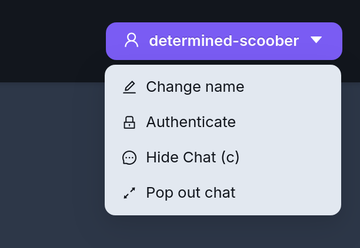
- FediAuth
- IndieAuth
联邦宇宙认证 (FediAuth)
Using your Fediverse account you can be sent a one time use six digit code to verify your identity and authenticate yourself with Owncast chat. 此功能需要在Owncast服务器上启用联邦宇宙支持。
The code arrives as a direct message to your account. 如果您没有收到此消息,请确保您可以接受 直接消息。
The code is valid for 10 minutes. After that you will need to request a new one.
IndieAuth
独立认证是一种开放的标准去中心化认证协议,旨在验证以URL表示的用户的身份。 这意味着任何具有支持独立认证的现有URL的人都可以使用它在Owncast聊天中进行认证。
访问 IndieAuth.net 了解更多信息。
Owncast是一个独立认证服务器
If you run an Owncast server you can use it as your IndieAuth provider by entering the URL of your server. Authenticating this way verifies you as the admin of that Owncast server.
Improve this page
See something missing or incorrect? Edit this page and improve the documentation for everyone.
