Owncast 现在支持自定义插件。
聊天审核
使用Owncast管理界面或在聊天中的内联审核控制,您可以移除单个消息或整个用户。
聊天主持人
主持人无法访问管理界面,存在的目的是帮助您保持聊天秩序。
In your admin, visit Users to find the user you want to grant Moderator privileges.
调出他们的详细信息,您就可以将他们添加为主持人。
默认情况下没有主持人,因此至少您可能想给自己一个。
当他们成为主持人时,主持人会收到通知,并在聊天中名字旁边有一个主持人图标,每个人都可以看到。
如何进行审核
成为主持人后,您可以将鼠标悬停在聊天消息上并打开菜单,您可以删除单个消息,或完全禁止该用户。
使用“更多信息”操作,您可以获取用户的简要概述,例如他们首次加入的时间。 该信息在小丑试图假冒某人时非常有用。
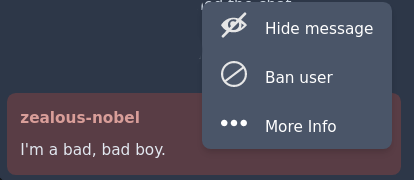
使用管理员移除聊天消息
Visit Chat > Messages in your admin to perform chat message moderation tasks.
单条消息
您可以通过点击每条消息右侧的可见性切换按钮(看起来像一个眼球)切换聊天中单条消息的可见性。
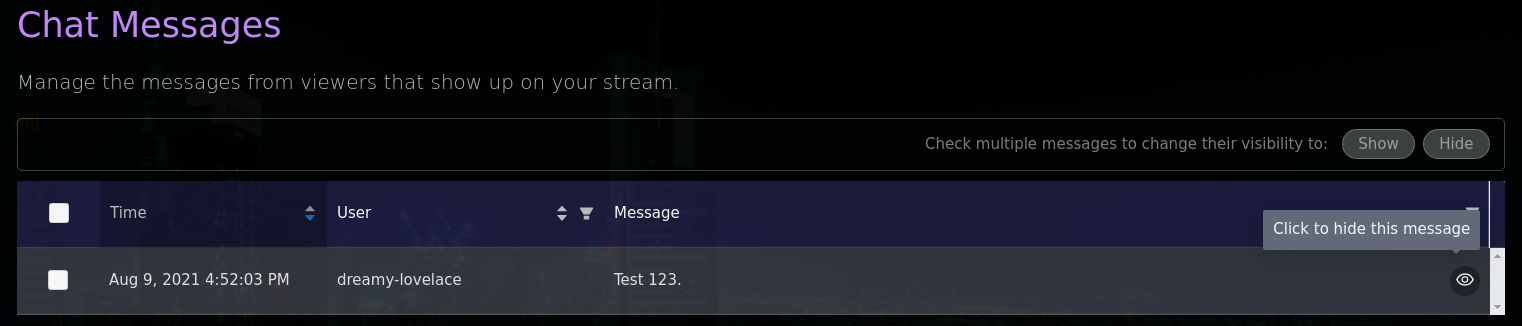
批量更改可见性

或者,您可以通过复选框选择要一次性更改的消息,然后按_“显示”或“隐藏”_按钮。
使用管理员禁止用户在您的聊天中
Visit Users in your admin to perform user moderation tasks.
禁止用户会立即将他们从聊天中断开,并在他们的浏览器中隐藏聊天界面。 这将移除该用户在聊天记录中发送的所有先前消息。
您可以解除对以前被禁止用户的禁令,但请注意这不会恢复这些已移除的消息。 如果需要,您可以手动恢复它们。

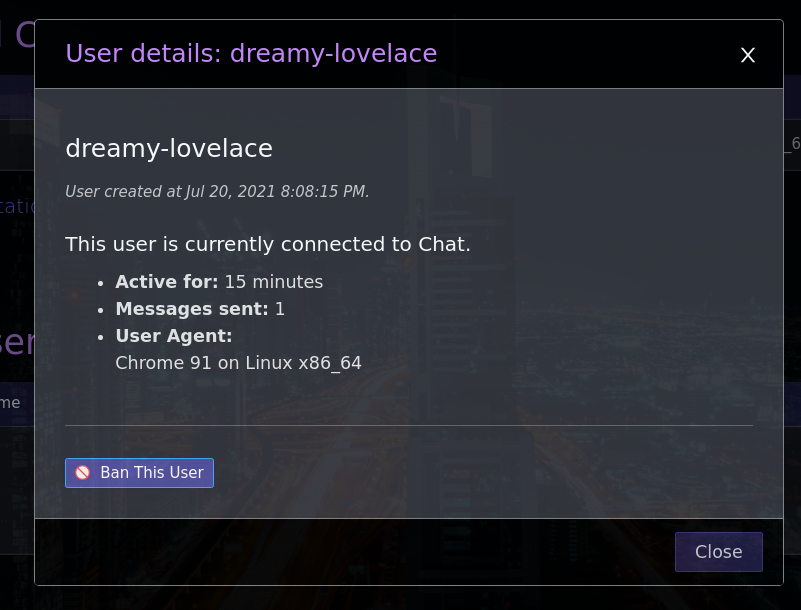
或者,您可以点击用户显示名称并调出用户信息模态框,从那里禁止他们。
Banning vs deleting
Banning is reversible, since you can un-ban the user later. The same menu also offers Delete user, which is permanent. It removes the user and all of their data, including their messages, and cannot be undone.
IP地址屏蔽
禁止用户时,Owncast将自动屏蔽其已知的IP地址。 虽然这可以威慑大多数小丑,但和其他任何事情一样,都有可能逃脱。
- 如果提供
x-forwarded-for头中提供了IP地址,则Owncast使用此地址,这意味着某人可能会用假地址覆盖此值。 如果您对此有所顾虑,请确保您的反向代理配置为显式设置正确的头值。 - VPN是存在的。 通过使用VPN,逃避IP地址禁令是非常简单的。
这就是要说明的:这个功能将有助于减少滥用,但绝不保证可以让最糟糕的人远离。 审核仍然是每个单独直播的责任。
被封锁的IP列表可以在管理员聊天用户界面中查看,并可以通过相同的界面解除禁令。
Chat settings
Visit Configuration > Chat in your admin to change how chat behaves:
- Chat: turn chat on or off entirely.
- Join Messages: announce in chat when a viewer joins.
- Welcome Message: a system chat message sent to viewers when they first connect. Leave it blank to disable.
- Forbidden usernames: a list of words that are not allowed in chat usernames.
- Default usernames: an optional list of usernames that new visitors get assigned. With fewer than 10 entries, random names are generated instead.
- Established users only: block messages from accounts younger than 15 minutes. Moderators are exempt.
- Chat language filter: reject messages that contain offensive language, using an internal word list.
- Require Authentication: only authenticated users and moderators may send messages.
速度限制器
Chat has a built-in rate limiter to prevent spam. It allows roughly one message every two thirds of a second. A user who floods faster than that is blocked from sending messages for 10 seconds and is told so. Moderators are never rate limited. You can turn the limiter off with the Spam Protection toggle in the chat settings.
Improve this page
See something missing or incorrect? Edit this page and improve the documentation for everyone.