 Owncast 现在支持自定义插件。
Packaging & publishing plugins
插件的分发格式是 .ocpkg 文件:一个包含你的 plugin.manifest.json、插件代码、public/ 和 assets/ 目录,并可选地包含图标和说明文档的单个包。 那一个文件就是服务器管理员安装你的插件所需的一切。
构建包
- JavaScript
- Python
- Native WebAssembly
npm run package
npm run package only rebuilds when the bundle is missing. After changing source, run npm run build first so the package doesn't ship stale code.
owncast-plugin-py package my-plugin
Use your language toolchain to compile the module, then package it as a ZIP with
the canonical plugin.wasm filename. The
Native WebAssembly guide includes build
commands for Rust, TinyGo, and AssemblyScript.
The resulting \<your-slug>.ocpkg contains the manifest and runnable code. It can also include the plugin's public/ and assets/ directories.
The JavaScript and Python packagers run the built plugin through owncast-plugin-test --load-only before writing the archive. This uses the same install-time load path as a real server, covering register(), manifest and runtime agreement, and permission-gated subscriptions. Native WebAssembly authors run owncast-plugin-test directly before packaging. See Native WebAssembly: Test before installing.
该文件是自包含的。 以你喜欢的方式分享:
- 将其附加到 GitHub release
- 在你自己的服务器上托管它
- 通过聊天或电子邮件交给管理员
插件图标
在项目根目录(与 plugin.manifest.json 并列)放置一个 icon.png,打包器会自动将其捆绑到 .ocpkg 中。 管理界面会从 /api/plugins/\<your-slug>/icon 获取它,并在插件列表以及为任何包含管理页面的插件在侧栏条目中渲染它。
my-plugin/
├── plugin.manifest.json
├── icon.png              bundled automatically
├── src/
├── public/
└── assets/
注意:
- 不需要权限。 主机直接提供该图标。 你不需要
http.serve。 - 该图标与操作按钮图标是分开的,后者位于
public/(通过 web 提供)并由actions[]条目的icon字段引用。 参见 UI: Action buttons。
说明文档
在项目根目录(与 plugin.manifest.json 并列)放置一个 INSTRUCTIONS.md,打包器会自动将其捆绑到 .ocpkg 中。 管理界面会从 /api/admin/plugins/\<your-slug>/instructions 获取它,并在插件详情页的 Instructions 选项卡中将其作为 Markdown 渲染。
my-plugin/
├── plugin.manifest.json
├── INSTRUCTIONS.md          bundled automatically
├── src/
├── public/
└── assets/
用于安装步骤、配置说明、请求的权限及其原因,以及管理员在安装后需要知道的任何其他事项。 没有说明文档的插件不显示 Instructions 选项卡。 文件名是固定的(INSTRUCTIONS.md)。 不需要 http.serve 权限。
该文件面向管理员,因此请为安装了你插件并打开管理界面以了解如何使用它的主播来编写。 面向开发者、README 风格的说明应放在你仓库的 README 中。
.ocpkg 内包含什么
plugin.manifest.json- One code entry:
plugin.js,plugin.py, orplugin.wasm - 如果你提供了则包含
icon.png - 如果你提供了则包含
INSTRUCTIONS.md - 如果你有
public/目录,则包含其内容(在/plugins/\<slug>/下通过 web 提供) - 如果你有
assets/目录,则包含其内容(主机可读取,用于在清单字段中内联内容)
The code filename selects the runtime. A native module must be named plugin.wasm inside the archive, regardless of the plugin slug.
Build inputs such as node_modules, package.json, pyproject.toml, Cargo.toml, and uncompiled source do not belong in the package. They produce the code entry that the server runs.
Loose native WebAssembly files
During development, a native module can be installed without creating an .ocpkg. Copy the module and manifest into data/plugins/ with the same basename:
data/plugins/
├── my-plugin.wasm
└── my-plugin.manifest.json
Owncast scans for the .wasm file and reads the matching .manifest.json. The packaged .ocpkg format is still recommended for distribution because it keeps the code, manifest, and optional assets together.
在服务器上安装
在 Owncast 管理界面中,打开侧栏的 Plugins,然后点击 Upload plugin。 选择你的 .ocpkg,服务器会就地安装它。 新插件会立即出现在列表中。
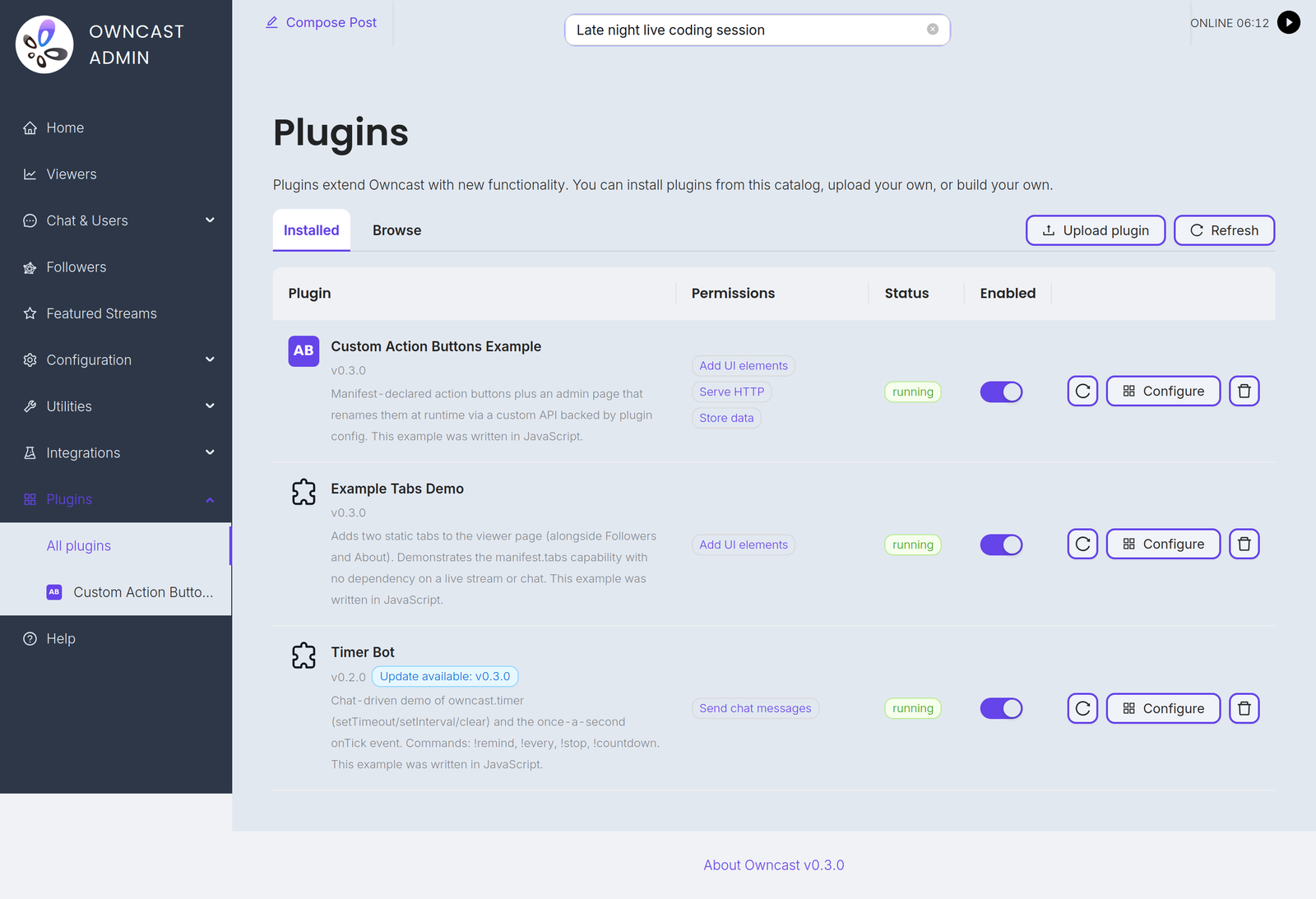
如果管理界面不可用(自动化、无浏览器访问、脚本部署),你也可以将 .ocpkg 直接放入服务器的 data/plugins/ 目录:
scp my-plugin.ocpkg user@your-owncast-server:/path/to/owncast/data/plugins/
服务器会定期扫描该目录。 插件会在几秒钟内出现在管理员的 Plugins 页面中。
无论哪种情况,都在管理界面完成安装:
- 在列表中点击你的插件以打开其详情视图。
- 查看 Permissions 选项卡。 这些正是你的清单所声明的内容。
- 切换 Enabled 以加载插件。 第一次启用时还会记录批准的权限集。
更新已安装的插件
To ship an update, replace the package file in data/plugins/ directly, or install the new version from the admin's Browse tab if you publish to the directory. The manifest's slug is the identity key: the new contents replace the existing entry with the same slug, whatever the file was called. 要强制立即重新加载已启用的插件,请在其行上点击 Reload。
Uploading from the admin's Plugins page only installs a new plugin. An upload whose slug already belongs to an installed plugin is rejected ("uninstall it before uploading another plugin with the same slug"), so uninstall the old one first if the admin upload is your only update path.
Two files in data/plugins/ that declare the same slug are also a conflict. Owncast keeps the first one it finds, ignores the other, and logs which package was skipped.
权限变更时会发生什么
- 你移除了权限。 静默处理。 插件会以更小的权限集重新加载。
- 你添加了权限。 The old approved version keeps running (it holds only the approved permissions) and the new package waits as pending, with a "needs re-approval" badge in the plugin list. The admin reviews the new permissions in the Permissions tab (new entries are tagged) and clicks Approve to accept the expanded set and load the update.
插件的有效能力在没有管理员明确同意的情况下不会增长,即使在更新中也是如此。
版本号递增
每次发布时在 plugin.manifest.json 中提升 version。 It's what admins see in the plugin list and what the registry uses to tell releases apart. The host doesn't gate loading on it: update identity is the slug, and the load-time check compares slug and permissions, not version.
版本控制是给人的。 推荐使用 Semver,但不强制。
禁用与卸载
- 禁用会保留插件安装但停止加载它。 管理员的选择会在重启后保持。 再次切换 Enabled 即可重新加载它。
- 卸载会完全移除插件。 在管理员的 Plugins 页面中点击插件行上的垃圾桶图标并确认。 (你也可以直接从
data/plugins/中移除.ocpkg,下一次扫描会检测到该删除。)
分发清单
在发布插件之前:
- 清单只声明你实际使用的内容。 删除未使用的权限。 你要求的范围越窄,管理员作出信任决定就越容易。
- 已填写
description。 管理员在插件列表和安装过程中会看到它。 一句话概述插件的功能。 version反映你正在发布的内容。 Semver 是惯例。- 你仓库中的 README 应说明插件的功能、请求的权限及其原因,以及需要配置的内容(环境变量、管理页面设置等)。
- 测试通过。 你的 SDK 的测试命令应该是绿色。
- 如果有图标,请将其包含在内。
INSTRUCTIONS.md应包含管理员在安装后需要知道的任何信息:安装步骤、配置说明、每个权限被请求的原因。 具有非显而易见行为或需要配置的插件应提供一份说明。 简单的插件(例如一个 hello-world 聊天处理程序)则不需要。
发布到目录
将你的插件列在 owncast.directory 的公共目录中是可选的。 .ocpkg 是自包含的,因此你始终可以直接将其交给管理员。 目录只是让你的插件更易被发现,并为管理员提供一键安装和更新。
一些清单字段会影响你的列表展示,先将它们填写完整:name(显示名称)、version(每次更新都要提升)、slug(你的永久标识,参见 Manifest)、description(卡片上的一句话摘要)、permissions(保持最小,管理员会审查)以及可选的 icon.png。
登录
目录使用无密码的魔法链接登录。 前往 owncast.directory/plugins/login,输入你的电子邮件,然后点击收件箱中的链接。 你的电子邮件是你的作者身份,与您拥有的插件绑定。 在账号页面你可以设置一个可选的显示名称,该名称会在你的列表中作为作者显示。
提交
前往 owncast.directory/plugins/submit 并上传你的 .ocpkg。 目录会读取你的清单、验证包并发布该版本。 目前通过网站完成提交,没有命令行发布步骤。 表单还接受一些可选项:预览图片(截图,PNG 或 JPEG,最大 5 MB)、主页链接、浏览标签,以及可覆盖清单描述的摘要。
所有权与更新
- 首位提交者拥有该 slug。 当你首次发布某个 slug 时,它会绑定到你的账户,其他人不能在该 slug 下发布。 对另一个作者拥有的 slug 的提交会被拒绝。
- 每个版本只发布一次。 要发布更新,在清单中提升
version,重新打包并再次提交。 - 在 owncast.directory/plugins/account 管理你的插件,你可以在此查看你发布的所有内容并移除某个列表。
运营者会看到什么
在目录的浏览视图中,你的插件会显示其名称、作者、描述、图标、最新版本以及如果你上传了预览图则显示预览图。 当管理员安装它时,Owncast 会显示你的清单请求的权限、渲染你的 INSTRUCTIONS.md,并列出你注册的任何聊天命令。 这些元数据是运营者用来决定是否信任并启用你的插件的信息,因此请以该读者为目标来编写它们。
下一步该去哪里
- Manifest reference 包含清单字段的完整列表。
- Permissions 说明信任模型及完整权限列表。
- Example plugins: JavaScript · Python.
Improve this page
See something missing or incorrect? Edit this page and improve the documentation for everyone.
 Gabe Kangas