Plugin Permissions
每个 Owncast 插件在沙箱中运行,并且没有隐式访问权利去访问插件之外的任何东西。 要执行有用的任务(读取聊天信息、发布到联邦网络、获取 URL、写入键值存储),你的插件通过 owncast.* 方法请求主机的权限。 Almost every one of those methods is gated by a permission you declare in your manifest. The exceptions are a handful of ambient methods that reach nothing sensitive and need no permission: owncast.log.*, owncast.timer.*, reading your own bundled assets, and owncast.config.get.

Plugins require Owncast 0.3.0 or later.
当管理员安装插件时,插件详细信息页面上的 权限 标签在简单的语言中列出了插件所请求的确切权限。 那就是信任边界:管理员可以安装第三方插件,而不需要审核每一行代码,因为清单限制了插件的功能。
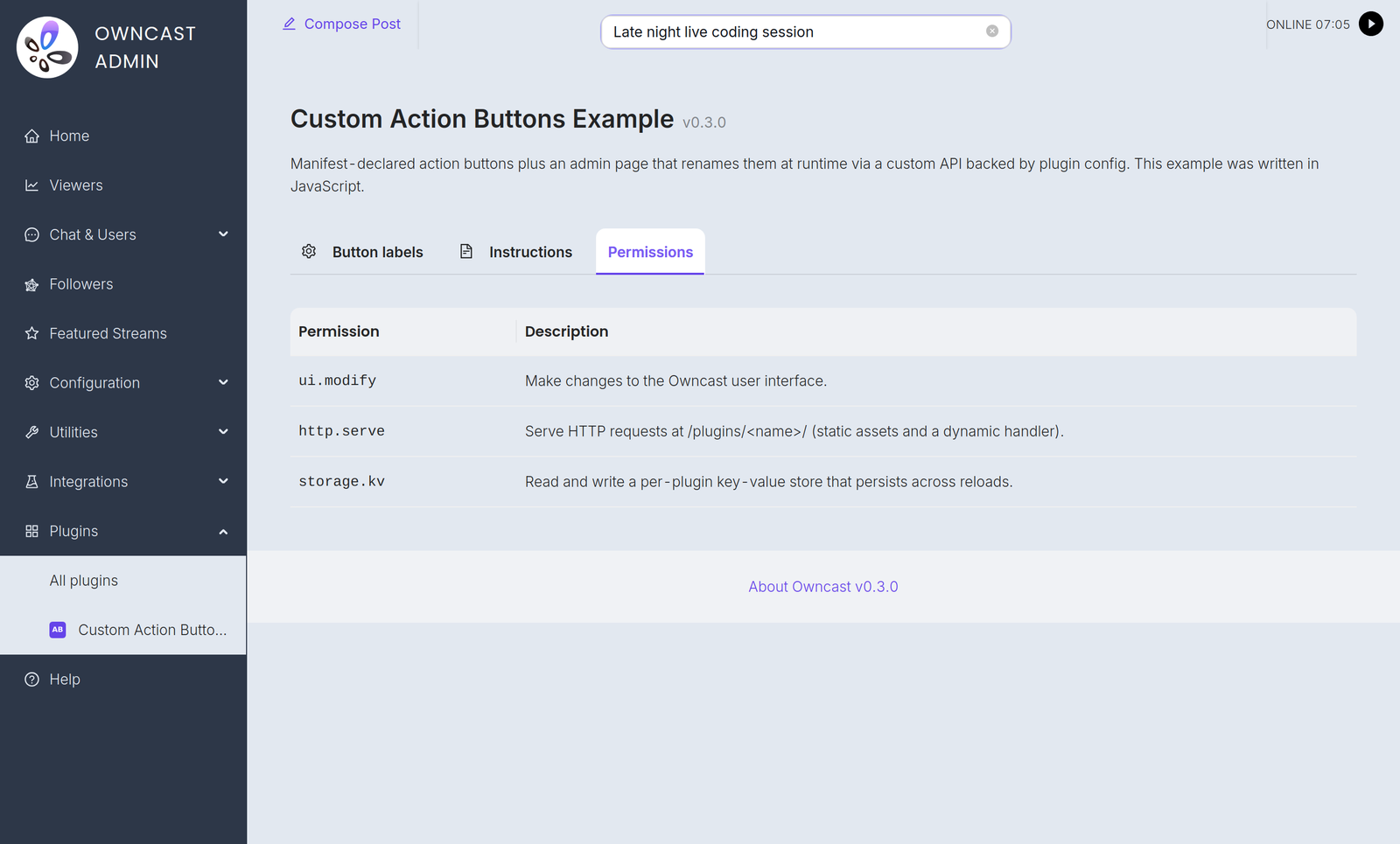

无论你使用哪个 SDK,权限标识符和信任模型都是相同的。 owncast.* 方法在此通过其规范名称引用。 有关你语言的确切拼写,请参阅 JavaScript 或 Python SDK 参考。
工作原理
-
你在
plugin.manifest.json中声明权限:{ "permissions": ["chat.send", "storage.kv"] } -
管理员在启用时查看这些权限。 Owncast 的插件详细信息页面列出了每个权限及其人类可读的描述。
-
主机在运行时强制执行这些权限。 Calling
owncast.chat.send(...)withoutchat.sendin your manifest never reaches Owncast: the host logs the denial and the call does nothing. Mutating calls that report an outcome raise an error (moderation,users.register,auth.grantSession,kv.set,videoConfig.write,actions.add,actions.clear, and everysqlmethod), readers return an empty or zero value, and calls that return nothing become silent no-ops.fs.write,fs.delete, andstorage.uploadreport failure in their return value instead of raising. -
主机捕获漂移。 你构建的插件在运行时声明它所使用的权限。 主机将其与清单进行比较,并拒绝加载插件如果运行时请求的权限超出清单所授予的权限。 你无法通过在事后替换插件文件来获取额外的访问权限。
权限扩大时的重新批准
If you ship an update that asks for more permissions than the admin previously approved, the old approved version keeps running (it holds only the approved permissions) and the new package waits as pending. The plugin list shows a "needs re-approval" badge. The admin reviews the new permissions in the Permissions tab and clicks Approve to accept the expanded set and load the update. 缩小权限是静默的。
已安装插件的有效能力在管理员再次同意之前不会增长。
权限参考
chat.send
授予:
owncast.chat.send(text):作为插件的机器人身份发布owncast.chat.sendAction(text):发布一条“/me”消息owncast.chat.sendTo(clientId, text):私人消息发送给已连接的客户owncast.chat.replyTo(msg, text): whisper a reply back to whoever sent a chat message (sugar oversendTo)owncast.chat.system(body):发布一条不带用户身份的系统消息,呈现为服务器公告(正文为 HTML)
消息经过 Owncast 的正常聊天流程(过滤、速率限制、持久化、管理)。 插件不能以任意名称发送或假冒真实用户。
chat.history
授予:
owncast.chat.history(limit?):读取最近的聊天消息owncast.chat.clients():列出已连接的聊天客户
只读。
chat.moderate
授予:
owncast.chat.deleteMessage(messageId):从观众那里隐藏一条消息owncast.chat.kick(clientId):断开聊天客户端的连接
chat.filter
授予定义 filterChatMessage(msg) 的能力:在广播每条聊天消息之前查看每条消息,并能够重写或丢弃它。
过滤在每条聊天消息的内联中发生,因此管理员需要明确看到这一点。 如果插件定义 filterChatMessage 而没有声明此权限,则主机拒绝加载。
users.read
Grants:
owncast.users.list():读取聊天用户列表owncast.users.get(id):读取单个用户记录
users.moderate
授予:
owncast.users.setEnabled(id, enabled, reason?):启用或禁用用户owncast.users.banIP(ip):禁止某个 IP 加入聊天
users.register
Grants owncast.users.register({ authId, displayName?, scopes?, profileUrl?, handle?, public? }): find or create an authenticated Owncast user for an external identity and return its userId. The authId is a stable, provider-scoped identifier such as "github:583231". Pass it raw, without prefixing your slug. The host records the slug separately and scopes every lookup to that pair, so two plugins cannot collide with or spoof each other's users.
The optional profileUrl, handle, and public fields attach a verified external identity. The profile URL must be empty or an absolute HTTP(S) URL. Set public to true only after the viewer opts into public display. These profile fields are captured on the first registration.
这就是插件如何将第三方登录(OAuth、Discord、共享密码)转换为真实的 Owncast 用户,带有认证的聊天身份。 单独使用它既不限制网站也不发出会话:将其与 auth.gate 配对以构建登录门,或单独使用它来生成验证的聊天身份。
auth.gate
授予查看者身份验证门:
owncast.auth.grantSession({ userId, ttl? }): issue a signed session for an already-registered user (seeusers.register)owncast.auth.endSession():清除当前查看者的会话(注销)- 可选的
onAuthCheck处理程序:在每次页面加载时重新验证查看者的会话
持有 auth.gate 的插件是 身份提供者。 While it is enabled, viewers must authenticate through it before they can reach the page, chat, or the API. The operator selects one cumulative access mode on the plugin's Authentication tab to decide whether Owncast-hosted video and stream status also require a session. 同时只能启用一个 auth.gate 插件,并且门在关闭时失败:如果插件不可用,则将禁止查看者访问,而不是让其进入。 有关完整模型,请参见 身份验证。
storage.kv
Grants owncast.kv.get(key), owncast.kv.set(key, value), and the JSON helpers owncast.kv.getJSON(key, fallback?) and owncast.kv.setJSON(key, value): a per-plugin namespaced key/value store. 插件不能读取其他插件的键。
状态在重新加载和主机重启之间持续。
storage.upload
Grants owncast.storage.upload(name, data): upload a file to Owncast's public file area and get back a URL. 适用于徽章、动态生成的图像、联邦网络帖子附件。
storage.fs
Grants owncast.fs.*: a private, sandboxed filesystem at data/plugin-storage/<your-slug>/files/ that your plugin can read, write, list, and delete within. 适用于缓存、生成的数据文件、附加式日志或需要持续作为真实文件而不是键/值字符串的任何内容。
与 storage.upload 不同,这些文件保持 服务器端:它们永远不会通过 HTTP 提供。 每个路径都限制在你插件自己的目录中:插件不能读取其他插件的文件或逃离其沙箱(../ 和绝对路径被回退到内部)。
storage.sql
Grants owncast.sql.*: one private SQLite database per plugin, at data/plugin-storage/<your-slug>/db/plugin.db. owncast.sql.exec(sql, params?) runs statements, owncast.sql.query(sql, params?) returns matching rows, and owncast.sql.queryRow(sql, params?) reads a single row. Reach for this instead of storage.kv when you need to sort, filter, or aggregate rather than just remember a value. See owncast.sql.* for the methods in both languages, the per-call limits, and the SQL the host refuses.
The database is private to your plugin and separate from Owncast's own database. The storage.fs sandbox is rooted at files/, so db/ is not a path owncast.fs.* refuses but one it cannot express, and the filesystem quota walk covers files/ only, so the two quotas stay independent: the database has its own 128 MiB cap, and files written through storage.fs count against a separate 256 MiB quota.
Plugin databases are not included in Owncast's database backups, so treat the contents as rebuildable or export what matters yourself. SQL data is retained when a plugin is uninstalled, the same as its config and its storage.fs files, so a reinstall finds its tables where it left them. An admin who wants the space back deletes data/plugin-storage/<your-slug>/.
network.fetch
授予 owncast.http.fetch(url, opts?):同步外发 HTTP。
需要在清单中有一个伴随的 network.allowedHosts 列表。 如果在没有允许列表的情况下授予 network.fetch,则主机拒绝加载。 每个调用都与允许列表进行检查。 不匹配的主机在任何字节离开服务器之前返回错误。
{
  "permissions": ["network.fetch"],
  "network": { "allowedHosts": ["api.discord.com", "*.weather.com"] }
}
允许通配符 "*",但必须明确写出,以便审核清单的管理员看到范围。 管理员 UI 在 权限 标签上显示完整的 allowedHosts 列表,其旁边是 network.fetch 行,因此审核插件的服务器操作者清楚看到它可以访问哪些主机,无需解压 .ocpkg。
events.emit
Grants owncast.events.emit(eventType, payload). Pass the receiving plugin's
fully qualified <recipient-slug>.<hook> name. The host does not rewrite the
emitted name. Declaring and receiving a plugin-owned custom hook does not
require a permission.
http.serve
授予主机的 HTTP 路由器权限,向你的插件发送位于 /plugins/<your-slug>/* 的请求。 这涵盖了位于你的 public/ 目录中的静态文件和路由到你的 onHttpRequest 处理程序的动态请求。
没有此权限,整个 /plugins/<your-slug>/ URL 空间返回 404。
http.sse
授予 owncast.sse.send(channel, event, data),并暴露一个主机拥有的端点,在 /plugins/<your-slug>/_sse/<channel>,浏览器通过 EventSource 连接。 与 http.serve 独立。 插件可以推送事件,而不服务任何其他路由。
server.read
授予只读流和服务器状态 APIs:
owncast.stream.current():直播流状态owncast.stream.broadcaster():入站编码遥测owncast.server.info():服务器名称、版本、摘要owncast.server.socials():配置的社交链接owncast.server.emotes(): custom chat emotes configured on this serverowncast.server.federation():联邦设置owncast.server.tags():配置的标签
videoconfig.read
授予 owncast.videoConfig.read():读取输出和转码配置(编码器、延迟等级、流变种)。
videoconfig.write
授予 owncast.videoConfig.write(partial):修改视频输出配置。
高信任。 更改将在下次流启动时应用。 主机不会重新启动正在进行的广播。 管理员应谨慎授予。
notifications.send
授予广播通知 API:
owncast.notifications.discord(text):通过流媒体配置的 Discord webhookowncast.notifications.browserPush({ title, body, url? }): to subscribed browsersowncast.notifications.fediverse({ type, body, image?, link? }): fediverse-formatted notification
fediverse.inbound
授予订阅所有七个入站联邦网络插件事件:
fediverse.followfediverse.likefediverse.repostfediverse.quotefediverse.mentionfediverse.replyfediverse.activity
fediverse.activity 捕获所有经过验证的活动的原始 JSON 对象。 它在任何匹配的专业事件之外运行。 此权限仅涵盖接收活动。 从 Owncast 账户发布需要单独的 fediverse.post 权限。
fediverse.post
授予 owncast.fediverse.post(text):代表 Owncast 账户在联邦网络上发布公开帖子。
高信任:帖子以流媒体用户自己的联邦网络身份发布,且无法静默撤回。 管理员应谨慎授予。
ui.modify
授予在 Owncast 的自有框架中放置 UI 的能力:
- 声明
manifest.actions(流下的操作按钮)。 - 在运行时调用
owncast.actions.add(...)/.clear()。 - 声明
manifest.styles(内联到查看页面的 CSS)。 - 声明
manifest.scripts(内联到查看页面的 JavaScript)。 - 声明
manifest.extraPageContent(提前添加到查看者的额外内容区域的 HTML 块)。 - 声明
manifest.tabs(查看页面选项卡行中的额外选项卡)。 - 实现
onPageStyles或onPageScripts处理程序(在请求时返回 CSS 或 JavaScript,没有清单字段)。
没有此权限,声明任何这些字段的清单在加载时将被拒绝。 onPageStyles 和 onPageScripts 处理程序没有清单字段,因此不会在加载时被拒绝。 主机不会调用它们,除非插件持有 ui.modify。 这些都深入到查看页面,而不是停留在插件自己的 URL 空间内,因此管理员需要看到权限,以了解插件将内容绘制到主机 UI 中。
这四个查看者注入字段不需要 http.serve,这两个处理程序也不需要。 主机从插件的 assets/ 目录读取每个文件(而不是从 URL),或调用处理程序,并将结果内联到现有配置/自定义 JS 响应中,因此仅仅拥有 ui.modify 就足够了。
摘要表
| 权限 | 授予 |
|---|---|
chat.send | owncast.chat.send, .sendAction, .sendTo, .replyTo, .system |
chat.history | owncast.chat.history、.clients |
chat.moderate | owncast.chat.deleteMessage、.kick |
chat.filter | 订阅 filterChatMessage(阅读、修改或丢弃每条聊天信息)。 |
users.read | owncast.users.list、.get |
users.moderate | owncast.users.setEnabled、.banIP |
users.register | owncast.users.register:为外部身份查找或创建已认证用户 |
auth.gate | owncast.auth.grantSession、.endSession 和 onAuthCheck 处理程序:担任网站的认证网关 |
storage.kv | 每插件命名空间的键/值存储 |
storage.upload | 将文件上传到 Owncast 的公共文件区域 |
storage.fs | Private, sandboxed server-side filesystem at data/plugin-storage/<your-slug>/files/ |
storage.sql | Private per-plugin SQLite database at data/plugin-storage/<your-slug>/db/plugin.db |
network.fetch | 外发 HTTP。 还需要 network.allowedHosts |
events.emit | 为其他插件发出自定义事件 |
http.serve | 在 /plugins/<your-slug>/* 提供 HTTP 服务 |
http.sse | 通过 owncast.sse.send 和 /_sse/ 端点推送实时事件 |
server.read | 读取流状态、服务器配置、编码遥测 |
videoconfig.read | 读取输出/转码配置 |
videoconfig.write | 修改视频输出配置(适用于下一个流开始时) |
notifications.send | 发送 Discord、浏览器推送或联邦网络通知 |
fediverse.inbound | 订阅所有七个入站事件:fediverse.follow、.like、.repost、.quote、.mention、.reply 和 .activity |
fediverse.post | 公共发布到联邦网络(限流) |
ui.modify | 向 Owncast 的查看器外观添加操作按钮或选项卡。 将插件 CSS、JavaScript 或 HTML 嵌入查看器页面 |
最小权限原则
仅声明你实际使用的内容。 你的清单越窄,管理员的信任决策就越容易。 如果你发现自己列出每个权限,退后一步,看看你的插件是否真的应该是两个插件。
如果在开发过程中停止使用某个权限,请将其从清单中删除。 缩减是静默的。 删除未使用条目时没有摩擦。
Improve this page
See something missing or incorrect? Edit this page and improve the documentation for everyone.
 Gabe Kangas